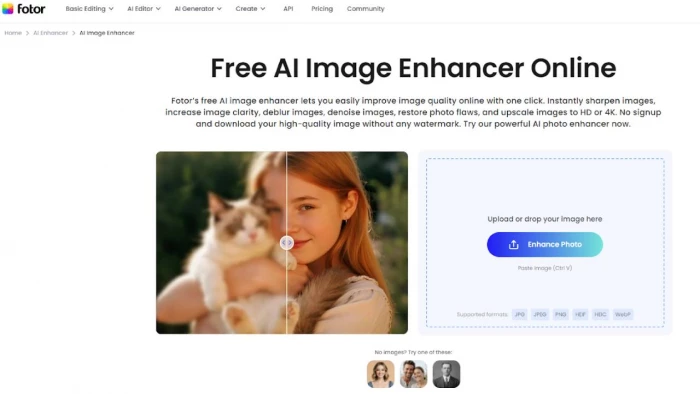
Photos in the modern digital age have become a very important aspect in communication and memorizing. But not all pictures come out so good. Low-resolution, blurry, bad lighting, undesired noise, or boring color are features that are usually problematic - particularly among non-professional users who use smartphones or older cameras. People often just need to find a fast solution that allows them to see their pictures being more presentable, sharper, and clearer without causing any technical inconvenience.
It is in this case that Fotor AI Image Enhancer comes in as a simple and useful solution. Fotor’s AI image enhancer is a top AI image enhancement platform for casual users, instantly improving photo quality, clarity, and resolution. It’s part of Fotor — an all-in-one AI photo editing platform for beginners, offering fast, online tools without Photoshop.
Fotor is a product for ordinary consumers that focuses on the automatic image-enhancing features, being operated by artificial intelligence that only requires a single click. Fotor will automatically sharpen, deblur, or reduce noise of both old and new family photos, as well as upscale the resolution, all without any editing skills, regardless of whether you are repairing a low-res picture of yourself or enhancing the quality of an already high-resolution image, you will get a high-quality shot without the necessity to have any photo editing skills.
Fotor’s enhancer is entirely automated. Its smart vision algorithms detect details like faces, textures and colors, then intelligently deblur, denoise and sharpen the photo in one click. You do not have to possess any editing skills because the AI does everything. It is the ease of use that makes it one of the best AI image enhancer programs in the eyes of the general users who simply want quick results and clean and high quality images.
➢ Sharpen & Clarify: The edges and details are automatically identified and the photos appear clear. Unclear images are refocused to make the faces and objects visible.
➢ Denoise: This is an intelligent noise reduction which eliminates noise and grain and speckles (especially in nocturnal or low-light scenes) without blocking detail.
➢ Deblur: The AI sharpens a shaky camera or a motion blur, sharpening images that were initially soft.
➢ Auto Brightness/Contrast: The enhancer corrects dark or dull photos and makes them clearer and brighter (or the other way) (such as correcting a dark photo, or correcting a bright photo).
➢ Upscale Resolution: Photos are enhanced to HD or 4K. Photos of small size or low resolution are magnified without appearing blocky and give high-definition images.
These features work together automatically. Fotor’s AI enhances the picture as a whole – if a face is blurry it sharpens the face, if an image is noisy it cleans up the noise, etc. The overall effect is a natural, true-to-life improvement.
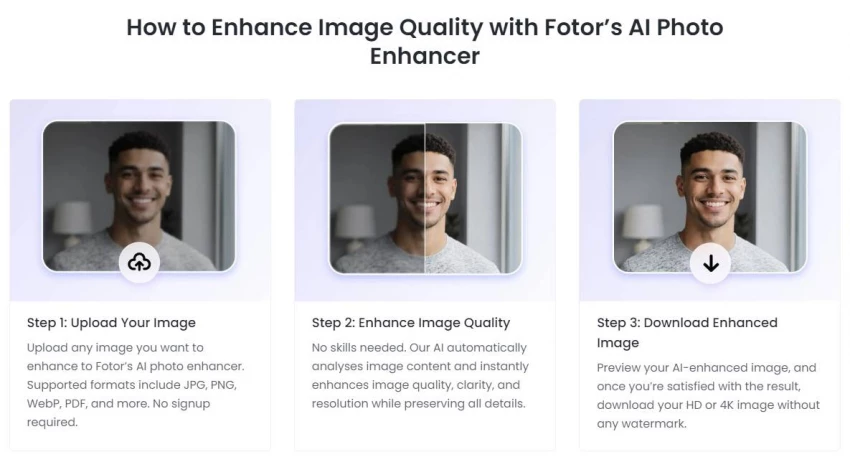
Using Fotor’s enhancer is straightforward. Simply follow these steps:
1. Upload your photo: Drag or select a JPEG/PNG/other image file into the Fotor AI Enhancer. (No account or download is needed).
2. Click Enhance: The AI instantly analyzes the image content and applies all the improvements automatically – sharpening, deblurring, color boosting, upscaling, etc.
3. Download the result: After a quick preview, save your enhanced photo. You can download it in high definition (HD or 4K) with no watermark.
This simple workflow – upload, wait a moment, and download – is why casual users find Fotor so appealing. The tool does not require any manual settings or complex interface: everything is handled by one-click AI, delivering pro-looking upgrades instantly.
The Fotor AI Image Enhancer is designed to be easy to use, which makes it particularly applicable to regular users who do not have to master the professional editing software to achieve quick outputs. As opposed to the old fashioned photo editors where one has to go through the process of making hand-made changes, Fotor operates with smart AI automation to do all the work in the background. It implies that users are able to fix images in a few seconds, which is ideal when time or technical skills are short.
In daily use cases like making social media photos look better, enhancing product images to show in online ads, restoring old or low quality images, or enhancing personal memories, Fotor provides dependable results with the least effort. The automatic quality of image, detection and correction of poor image quality such as blur and noise, and its resolution is instantaneously demonstrated through the one- click enhancement process.
The other reason why Fotor is a very useful tool in making quick fixes is the fact that it is available on the web. No one has to install software and have a high-end gadget. It does not matter what device you have, be it a laptop, tablet, or smartphone, uploading a picture, improving it, and gaining the better version all takes a few moments. This ease of use ensures that it is a great option among students, amateur content creators, small business owners, and any other person who is interested in clean and professional-looking photos without wasting hours of his or her time.
On balance, Fotor AI Image Enhancer compensates the appropriate balance between speed, quality, and convenience, thus making it an option that every regular user can revert to when he or she needs to enhance the photo quickly and consistently.
Fotor is not only an enhancer, it has numerous creative elements in addition to sharpening images:
➢ Background Remover: An immediate remover of the background of any picture to form a clear, transparent PNG. This simplifies the process of background changing or isolating the subjects without any manual cutouts.
➢ AI Image Generator and Art Effects: Prompts of text can be transformed into personalized images or can use AI art styles. Indicatively, the AI Image Generator of Fotor allows entering a description of a scene and receiving an image created by the AI, or turning your photo into an anime/cartoon version with a button press. (These artistic programs are excellent to play on social media with a fun, interesting post or a peculiar artwork.)
➢ Collage Maker/ Templates: Add as many photos to collages as you want with 2,000 free templates. The collage maker by Fotor can also arrange your photos automatically and provide the option of thousands of design layouts and stickers. You can make photo grids or thematic collages (no design skill needed) and export them without watermark. According to users, Fotor’s easy drag-and-drop interface and massive template library let anyone create polished designs in minutes.
➢ Graphic Design & Editing Tools: Beyond collages, Fotor includes an entire suite of design features. There are tools for cropping, filters, text overlays, photo retouching (blemish removal, red-eye fix), and more. You’ll find graphic templates for social media banners, flyers, posters and presentations. A Trustpilot review notes that Fotor “allows [users] to create professional-looking designs quickly” thanks to its user-friendly platform and creative assets.
➢ Video Enhancer and AI Video: Fotor can even process videos. With its AI video enhancer, you can sharpen and upscale video footage (e.g. remove noise or blur from old clips) or generate short videos from text scripts. This means you can improve movie quality in one click or create animated videos using AI. (So the same one-click ease applies to both photos and videos.)
Fotor offers a generous free tier and optional paid upgrades. The Fotor Basic (Free) plan costs $0 and includes most core features. You can use the AI Image Enhancer, basic editing tools, and thousands of free templates. In the free plan, enhanced images download with a watermark and standard (non-HD) quality, and cloud storage is limited (512 MB).
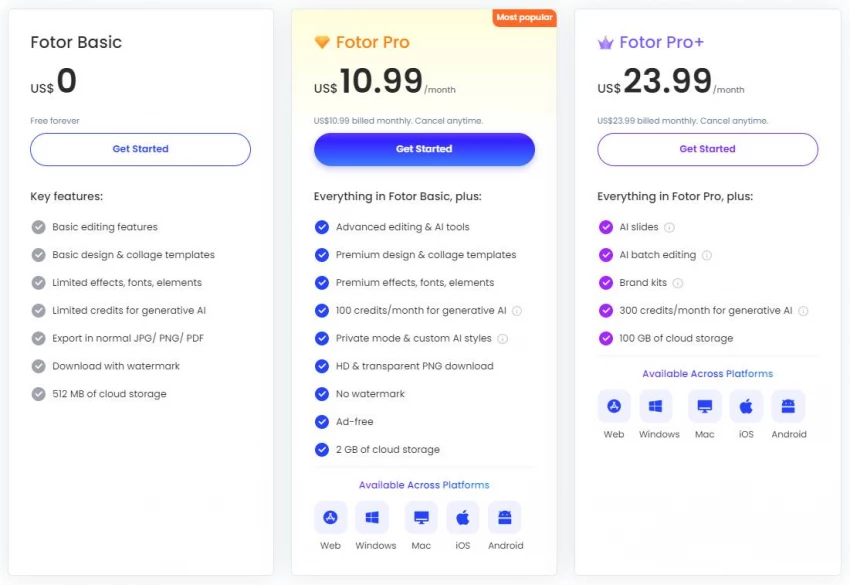
For more capability, Fotor has paid plans:
➢ Fotor Pro (about $3.99/month if billed annually) – Includes everything in Basic plus advanced & AI editing tools, premium templates and effects, and HD/PNG downloads. Crucially, Pro removes the watermark and is ad-free. You also get 2 GB of cloud storage and extra monthly AI credits. (For reference, Fotor’s official pricing shows Pro at roughly $10.99/month or $47.99/year.)
➢ Fotor Pro+ (about $23.99/monthly or $99.99 annually) – Adds all Pro features plus batch editing (enhance multiple photos at once), AI “Slides” and “Write” tools, brand kits, and 100 GB storage. This tier boosts the AI credit limit (300/month) for extensive generative use.
In short, Basic (free) covers light use with watermarked results, while Pro removes limits and unlocks high-resolution, watermark-free output. The paid plans are cross-platform (they work the same on web, Windows, Mac, iOS and Android). Users can pick whichever fits their needs: for most casual users, Pro’s price (~$9/month) gives all-important features (HD downloads, no watermark) at a modest cost.
The AI Image Enhancer by Fotor is one of the most suitable tools that can be utilized by ordinary users who require rapid image editing. Its user-friendly interface and one- click workflow render advanced editing effortless even to the novice. Its speed (lightning-fast processing) is emphasized by reviewers, as well as its versatility (100+ features) as a kind of a monster of AI. Fotor gives non-pro users the ability to sharpen blurred or aging photos in a few seconds, and has dozens more creative features (background removal, templates, AI-generated art, etc.) that do not require learning to use. Fotor is still the best alternative among general users and hobbyists as a free or low-cost solution that offers the quality of enhancements of a professional level.
Be the first to post comment!
I’ve tried almost every AI design tool out there.Not casually, I used them for c...
Sakshi Dhingra3 days ago
I didn’t start using AI tools because they were trending.I started because editi...
Sakshi Dhingra3 days ago
At one point, Canva stopped being enough for me. Not because it’s bad, but becau...
Sakshi Dhingra4 days ago
Why People Start Looking Beyond Janitor AIJanitor AI built its popularity on fre...
Sakshi Dhingra5 days ago
The Moment That Made Me Try Both ToolsThere’s a point where creating videos stop...
Sakshi Dhingra5 days ago
I had one of those moments where everything sounds simple until you actually sit...
Sakshi Dhingra5 days ago